
How to test crystal oscillators

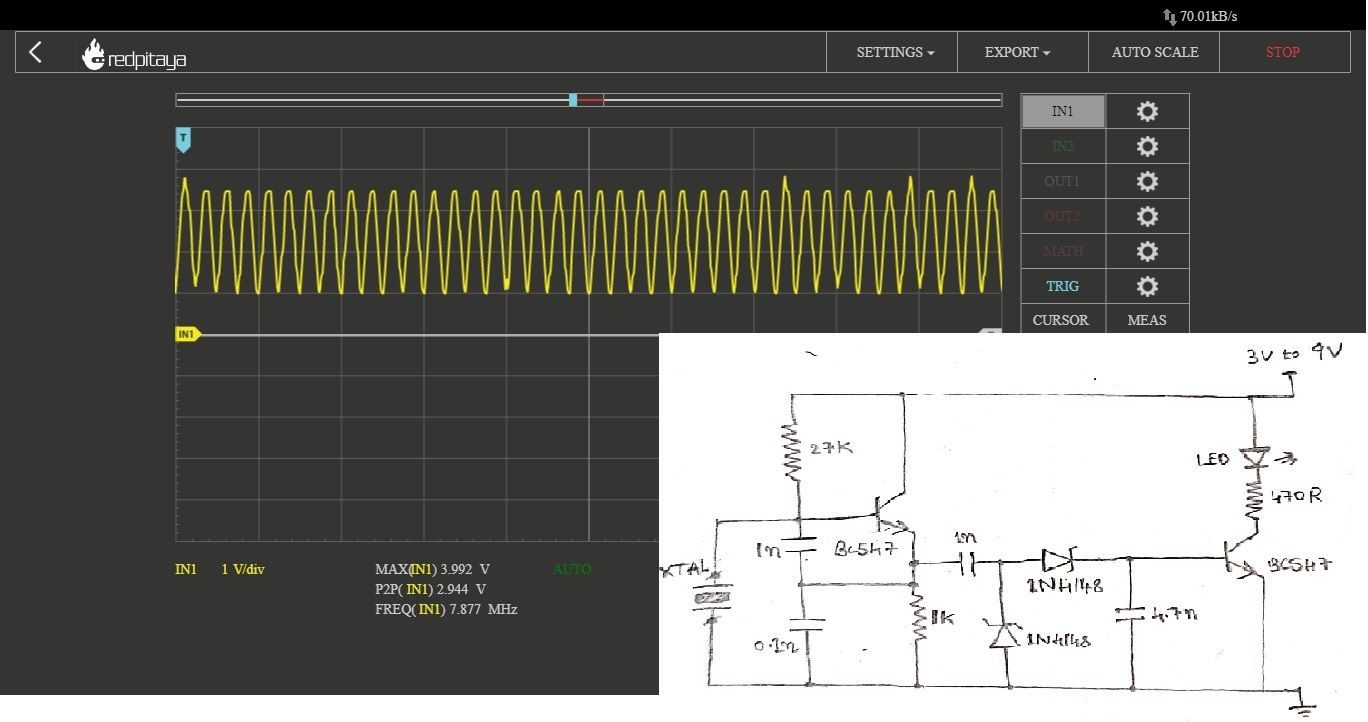
 This post is about a simple circuit to test  crystal oscillators . They are found in most of the RF and processing circuitry as an external component to provide clocking, time reference for synchronization of internal system operations. testing them isn't that straight forward by connecting its terminals to a multimeter or an oscilloscope. This is an interesting test circuit for crystals in 1MHz - 30MHz range with 2 NPN transistors, Zeners, some passives, and thought of testing a few crystals.
When the DUT crystal oscillates, the signal passes through the 1nF loading capacitor to the two Zeners, thereby charging the 4.7nF capacitor and turns on the second transistor which in turn illuminates the LED, indicating that it's all good!


Comments

Popular posts from this blog

Industrial Internet Use-Cases

The potential for the Industrial Internet is vast with opportunities spread over wide areas of productivity, such as logistics, aviation, transportation, healthcare, energy production, oil and gas production, and manufacturing. As a result, many use-cases will make industry executives wake up and consider the possibilities of the IIoT. After all, industry only requires a minimal shift in productivity to deliver huge revenue, an example is that even an increase of 1% of productivity can produce huge revenue benefits such as aviation fuel savings. In order to realize these potential profits, industry has to adopt and adjust to the Industrial Internet of Things. However, spotting, identifying, and then strategically targeting the opportunities of the IIoT is not quite as easy as it might seem. It is important, therefore, to create use-cases that are appropriate to vertical businesses. For instance, the requirements of manufacturing differ from logistics, which also differs to healthcare....

DigiSpark With 64-bit Ubuntu

DigiSpark . It’s about the size of a coin, plugs straight into your USB port and will probably cover most of your microcontroller project needs. The problem is that it doesn’t seem to play nice, out-of-the-box with 64-bit Ubuntu Linux. The DigiSpark isn’t a particularly New Thing – it was a KickStarter project from August 2012. Since it’s Open Hardware, the inevitable happens and some people in Shenzen have taken the board layouts and started cranking out the hardware super, super cheap. Here’s how to get it Working on Linux Install the standard Arduino IDE for 64-bit Linux. This is version 1.5 at the time of writing. Follow DigiSpark’s instructions for adding their extensions to the Arduino IDE. You should now see something like this listed when you lsusb: 16d0:0753 MCS Digistump DigiSpark . This is specifically for 64-bit Linux (Ubuntu 14.04LTS) at the time of writing: Download the Arduino IDE programmer binary for 64 bit here and use it to replace the version t...

Heating with Electric Radiators

You want to heat your small garage using a couple of electric radiators. The power and voltage requirements for each radiator are 1200 W, 240 V. But you are not sure how to wire the radiators to the power supplied to the garage. Should you use the wiring diagram on the left or the one on the right? Does it make any difference?